
Free Live Demo
English
An ecommerce business needs more than an attractive website to grow. It needs connected technology that supports online sales, inventory management, order fulfillment, customer relationships, and business decisions. The right ecommerce tech stack helps businesses manage these functions efficiently while preparing for new sales channels and changing customer expectations.
According to the National Retail Federation (NRF), U.S. retail sales are forecast to grow by 4.4% in 2026, reaching $5.6 trillion. As retail activity expands, businesses need technology that can handle increasing transaction volumes, maintain accurate inventory, and connect operations across channels. A scalable ecommerce tech stack provides the foundation for that growth.
However, adding more software does not automatically improve performance. Businesses need the right combination of tools, reliable integrations, and a clear plan for future expansion. This guide explains how to build an ecommerce tech stack that supports business growth without adding unnecessary complexity.
An ecommerce tech stack is the collection of software, platforms, applications, and integrations that power an online business. It connects the customer-facing shopping experience with the systems that manage products, payments, inventory, orders, and reporting.
For example, a retailer might use an ecommerce platform to operate its online store, a payment gateway to process transactions, an enterprise resource planning (ERP) system to coordinate business operations, and analytics software to measure performance. When these tools share data effectively, teams can work from more consistent information.
A typical ecommerce tech stack includes:
Not every business needs every component on day one. Choose technology that meets current needs while leaving room for future growth.
A technology setup that works for a small online store may struggle when the business adds more products, sales channels, warehouses, or locations. Disconnected applications can create duplicate records, inaccurate stock levels, delayed orders, and extra administrative work.
A scalable ecommerce tech stack helps businesses address these challenges in several ways.
As sales increase, systems must handle more product information, customer activity, and transactions. Scalable platforms help businesses expand capacity without rebuilding their entire technology environment.
For instance, an apparel retailer launching additional online storefronts needs a reliable way to synchronize product details, pricing, and inventory. A flexible technology foundation makes that expansion easier to manage.
Customers may browse products online, purchase them in a physical store, or choose to collect an online order in person. Disconnected systems make it harder to deliver a consistent experience.
Integrating ecommerce with point-of-sale (POS), ERP, and inventory systems helps retailers maintain better visibility into sales and stock across channels.
When applications operate independently, employees often enter the same information more than once. A connected tech stack reduces this duplication by moving data between systems automatically.
As a result, teams can spend less time reconciling records and more time improving customer service, merchandising, and business performance.
Reliable reporting depends on accurate, accessible data. Integrating sales, inventory, customer, and financial information helps decision-makers identify trends and respond to problems sooner.
For example, a jewelry retailer can use connected sales and inventory data to identify popular product styles, monitor stock availability, and make more informed purchasing decisions.
Building a scalable ecommerce tech stack starts with understanding how each technology supports the customer journey and the business processes behind it.
Your ecommerce platform provides the foundation for online selling. It manages the storefront, product catalog, shopping cart, checkout, and essential customer interactions.
When choosing a platform, evaluate:
Choose a platform that supports your current business model without restricting future expansion. For example, a retailer planning to introduce additional brands or regional stores should evaluate how easily the platform can manage multiple storefronts.
An ERP system connects essential business processes, including purchasing, inventory, financial management, and operational reporting. Integrating ERP software with ecommerce helps synchronize information between the online storefront and the back office.
Consider a footwear retailer selling through its website and physical stores. When the systems share inventory and order information, the retailer can reduce overselling, improve stock visibility, and coordinate fulfillment more effectively.
When evaluating ERP integration, look for:
For growing retailers, ERP integration can provide the operational foundation that keeps ecommerce expansion manageable.
Inventory and order management systems help businesses track stock, process orders, coordinate fulfillment, and manage returns.
Without reliable connections, an order may reach the ecommerce platform even when the product is no longer available. Employees may then need to cancel the order, contact the customer, or locate stock manually.
A connected inventory and order management setup helps businesses:
As order volumes grow, these capabilities help businesses maintain service quality without increasing manual work at the same rate.
Checkout plays an important role in the customer experience. A complicated process, unexpected costs, or limited payment options can discourage customers from completing a purchase.
Choose payment technology that supports your target markets, preferred payment methods, transaction security, and reconciliation requirements. Also, ensure that your checkout integrates with your ecommerce platform and financial workflows.
As your business expands, review how the payment solution handles additional currencies, transaction volumes, refunds, and reporting.
CRM software helps businesses organize customer profiles, purchase history, interactions, and engagement activities. When connected to ecommerce and POS systems, it can provide a more complete view of customer relationships.
For example, a specialty retailer can use purchase history to understand returning customers' interests and deliver more relevant product recommendations or loyalty communications.
A scalable CRM setup should support consistent customer records, appropriate data permissions, and integrations with marketing and sales systems.
Analytics tools help businesses understand how customers discover products, navigate the website, complete purchases, and interact with marketing campaigns.
However, website analytics alone cannot explain every operational issue. Businesses also need visibility into inventory, fulfillment, product performance, and cross-channel sales.
Connecting these data sources can help teams evaluate metrics such as:
The result is a more useful picture of business performance and a stronger foundation for planning.
Artificial intelligence can extend the capabilities of an ecommerce tech stack by helping businesses analyze data, automate selected workflows, and personalize customer interactions. However, AI delivers more practical value when it can access reliable business information and operates within clearly defined permissions.
Here are several ways businesses can introduce AI into their technology environment.
AI can analyze product information, browsing activity, and purchase patterns to help personalize product discovery. When businesses use appropriate data and clear privacy controls, these recommendations can make shopping more relevant to customers.
AI-powered forecasting can analyze historical sales, seasonal trends, and other relevant signals to estimate future demand. Retailers can use these forecasts to support replenishment planning and reduce the risk of excess or insufficient inventory.
For example, a home décor retailer can examine seasonal demand patterns before placing orders for products associated with a particular time of year.
AI-powered assistants can answer common product questions, help customers find relevant information, and support order-status inquiries. Connecting these tools to accurate product and order data can improve response quality.
Businesses should also establish clear escalation paths for requests that require human support.
AI can help identify exceptions, summarize reports, flag unusual activity, and recommend next steps. With appropriate safeguards, businesses can gradually automate selected tasks such as routine reporting or inventory alerts.
Before introducing AI, establish reliable data sources, access controls, monitoring, and human approval for consequential actions. AI should strengthen the technology stack rather than create another disconnected application.
A successful implementation starts with business requirements, not a list of popular software tools. Follow these steps to create a technology setup that supports sustainable growth.
Identify what you want your technology stack to achieve. Your priorities might include increasing online sales, launching new markets, improving inventory accuracy, reducing fulfillment delays, or connecting ecommerce with physical stores.
Translate these goals into measurable outcomes. For example, you might track order processing time, inventory discrepancies, or the amount of manual data entry required each week.
Document the applications your business currently uses and identify how they exchange information.
Ask your teams:
1. Which systems store product, customer, and inventory data?
2. Where do employees enter information manually?
3. Which processes rely on spreadsheets or workarounds?
4. Where do data inconsistencies occur?
5. Which tools limit expansion or integration?
This assessment helps you identify the gaps that matter most before investing in additional software.
Select the essential platforms that will support your main operations. For many retailers, these include ecommerce, ERP, POS, inventory management, payment processing, and analytics.
You do not necessarily need separate software for every function. Evaluate whether existing platforms already provide the capabilities you need before adding another application.
A smaller, well-integrated stack can be easier to maintain than a larger collection of overlapping tools.
Your applications should exchange information reliably. Evaluate available APIs, supported connectors, synchronization frequency, error handling, and integration maintenance requirements.
Also, decide which system serves as the primary source for each type of data. For example, your ERP might control inventory records while your ecommerce platform manages the online shopping experience.
Clear data ownership reduces conflicts and helps teams understand which records to trust.
Growth increases the importance of protecting customer information and maintaining service availability.
Build security into your technology decisions from the beginning. Consider user permissions, multifactor authentication, encryption, backups, monitoring, vendor security practices, and recovery procedures.
You should also establish a process for reviewing integrations and software updates as your technology environment evolves.
Start with a well-defined workflow that creates a clear business benefit. Examples include automated order updates, inventory alerts, routine reporting, or AI-assisted customer support.
Measure the results before expanding the scope. Track improvements in processing time, error rates, service quality, and operating costs.
A phased approach gives your team time to validate the results, improve data quality, and establish appropriate oversight.
A scalable ecommerce tech stack needs ongoing attention. Review system performance, integration reliability, licensing costs, security, and user feedback regularly.
When a new business requirement emerges, determine whether an existing system can meet it before purchasing another tool. This practice helps prevent unnecessary complexity and keeps technology aligned with your business strategy.
Even a well-planned technology investment can create problems when businesses overlook integration, maintenance, or long-term requirements.
Choosing tools without a clear strategy: Buying applications before defining business goals can result in overlapping features and unnecessary expenses. Start with operational needs and measurable outcomes.
Ignoring integration requirements: Two capable applications may still create problems if they cannot exchange data reliably. Confirm integration capabilities before making a purchase.
Adding too many disconnected applications: Every additional system can introduce maintenance, training, security, and data-management responsibilities. Add technology only when it addresses a specific need.
Overlooking inventory and order accuracy: A fast storefront cannot compensate for inaccurate stock information or unreliable fulfillment processes. Connect customer-facing systems with operational data.
Treating AI as a quick fix: AI cannot reliably correct poor data quality or unclear workflows on its own. Establish dependable data, access controls, and measurable use cases first.
Failing to plan for future growth: A solution that meets today's needs may limit tomorrow's expansion. Consider additional channels, locations, markets, transaction volumes, and integration requirements when assessing your options.
After implementation, evaluate whether your technology investments improve business performance. Choose metrics that connect directly to your goals rather than tracking every available number.
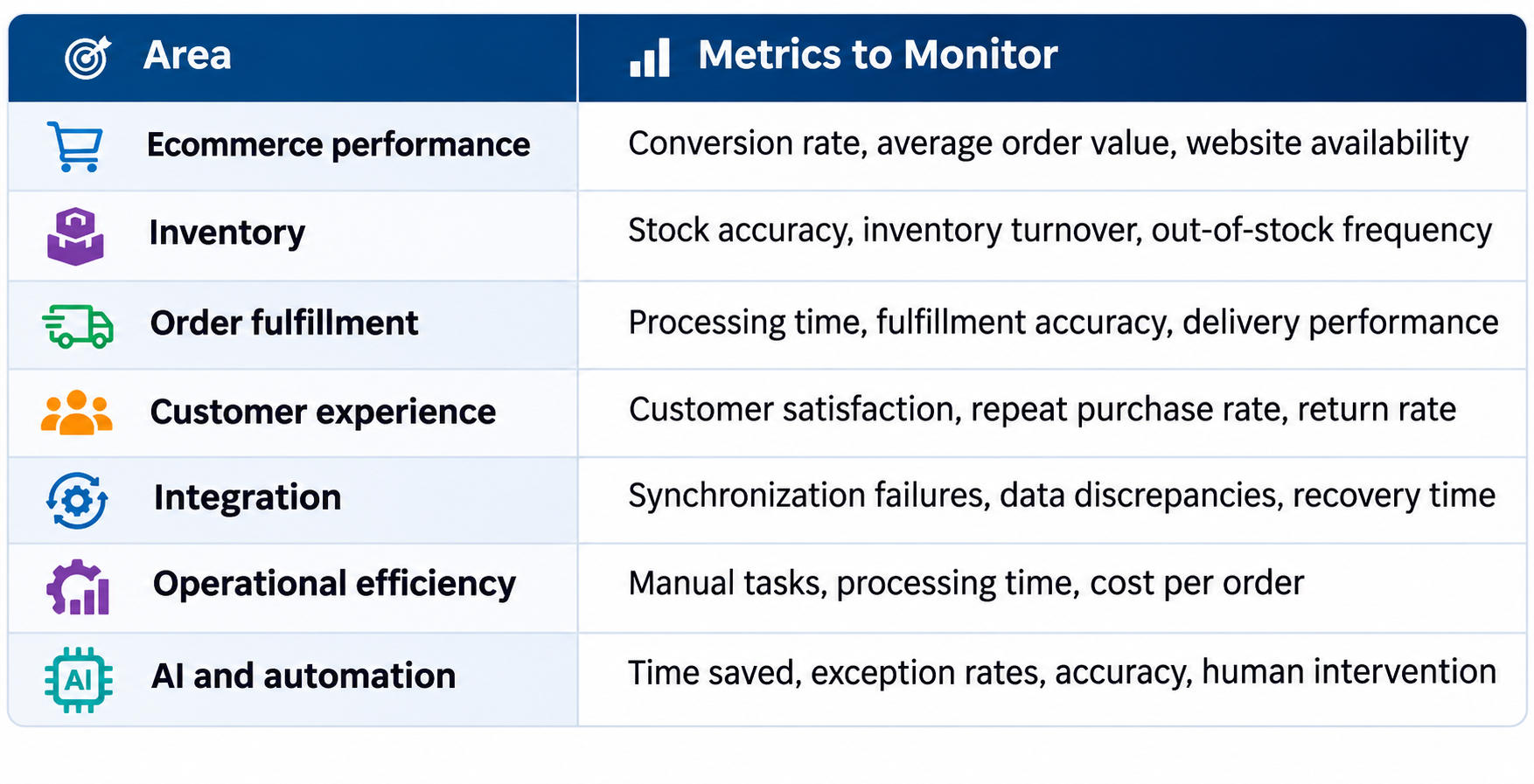
Establish a baseline before making changes. Then compare results over time to identify what works and where the business needs further improvements.
over time to identify what works and where the business needs further improvements.
Remember that technology should support broader business outcomes. A lower processing time matters most when it also improves accuracy, service, or operating efficiency.
Ecommerce technology will continue to evolve as businesses introduce new sales channels, automation capabilities, and AI-driven customer experiences. A future-ready stack does not need every emerging tool. Instead, it needs a stable foundation that allows the business to adopt useful capabilities without rebuilding its core systems each time.
Three principles can guide that approach:
For growing retailers, the goal is to create a connected technology environment that supports customers and employees alike. With the right architecture, businesses can expand their operations, respond to changing demand, and introduce new capabilities at a manageable pace.
1. What is the best ecommerce tech stack for a growing business?
The best ecommerce tech stack depends on your business needs, budget, and growth plans. Most businesses need an ecommerce platform, payment processing, inventory management, analytics, and integrations. Retailers with complex operations may also need ERP and POS systems.
2. What are the essential components of an ecommerce tech stack?
Essential components include an ecommerce platform, payment processing, inventory and order management, analytics, and system integrations. Depending on your needs, you may also require ERP, CRM, marketing automation, and AI tools.
3. How much does it cost to build an ecommerce tech stack?
The cost depends on software subscriptions, customization, integrations, hosting, and ongoing maintenance. Evaluate the total cost of ownership to ensure your technology investment supports long-term growth.
4. How does ERP integration improve an ecommerce tech stack?
ERP integration connects ecommerce operations with inventory, purchasing, accounting, and order management. It helps reduce manual data entry, improve inventory accuracy, and provide better visibility across sales channels.
5. Can AI be integrated into an existing ecommerce tech stack?
Yes. Businesses can integrate AI through compatible applications, APIs, and automation tools. Common uses include demand forecasting, product recommendations, customer support, and automated reporting.
6. How do you know when to upgrade your ecommerce tech stack?
Consider an upgrade when your systems create data inconsistencies, slow down operations, limit growth, or lack essential integrations. Improving existing systems or replacing individual components may solve these issues without a complete rebuild.
Building an ecommerce tech stack that scales require more than a powerful online storefront. Businesses also need reliable back-office systems to manage inventory, orders, warehouse operations, customer relationships, and financial reporting.
EcomDrive by Multidev provides an integrated e-commerce management and back-office solution designed for online retailers. It brings essential functions—including order management, inventory tracking, warehouse management, CRM, analytics, planning, and accounting—together in one platform. Its integration capabilities help businesses connect ecommerce operations with third-party services and support changing business requirements.
Whether you want to streamline order fulfillment, improve inventory visibility, or gain better control over your ecommerce operations, EcomDrive can help you build a stronger operational foundation for growth.
Ready to scale your ecommerce business? Request a free EcomDrive demo and discover how integrated ecommerce management can support your next stage of growth.
At Multidev, we collaborate with clients to deliver tailored retail and eCommerce solutions that optimize operations, enhance efficiency, and drive growth.