
Free Live Demo
English
Choosing the right POS system is critical for retailers managing multiple locations. A modern multi-store POS solution helps businesses centralize sales, inventory, customer data, and store operations while creating a consistent shopping experience across every location.
According to the National Retail Federation (NRF), retailers continue to invest in technology solutions that improve operational efficiency, strengthen customer experiences, and support seamless omnichannel shopping journeys.
As retail businesses grow, choosing between a cloud POS system and an on-premise POS system becomes an important decision. Each option offers unique benefits depending on a retailer's infrastructure, security needs, budget, and growth strategy.
This guide compares cloud vs. on-premise POS systems to help multi-store retailers choose the right solution for long-term success.
A multi-store Point of Sale (POS) system is a retail software solution that enables businesses to manage sales, inventory, customers, and operations across multiple store locations from a centralized platform.
Unlike a single-store POS system, a multi-store POS solution connects all locations, allowing retailers to:
For growing retail chains, a multi-store POS system provides the visibility and control needed to improve efficiency, reduce operational complexity, and deliver a consistent customer experience across every location.
Before choosing the best POS system for multiple stores, retailers need to understand how cloud and on-premise solutions work.
A cloud POS system stores software and data on remote servers managed through the internet. Retailers can access their POS system from multiple locations without maintaining physical servers at each store.
With a cloud POS system, updates, security patches, and system maintenance are typically managed by the software provider.
1. Easy Multi-Store Management
Cloud POS solutions allow retailers to manage multiple stores from a centralized platform.
Corporate teams can monitor:
This centralized approach helps retailers make faster decisions.
2. Real-Time Data Access
Retail leaders need accurate information to manage growing operations.
A cloud POS system provides real-time access to:
This visibility helps retailers respond quickly to changing demand.
3. Lower Infrastructure Costs
Cloud POS systems reduce the need for expensive hardware investments.
Retailers do not need to maintain:
This makes cloud POS solutions attractive for retailers opening new locations.
4. Faster Software Updates
Cloud platforms allow providers to release updates across all locations simultaneously.
Retailers benefit from:
without manually updating every store.
An on-premise POS system is installed and operated on a retailer's own servers and hardware infrastructure.
The retailer manages system maintenance, updates, security, and backups internally or through an IT team.
Many established retailers continue using on-premise POS solutions because they prefer greater control over their technology environment.
1. Greater Control Over Data
On-premise solutions allow retailers to control where and how their data is stored.
This can be important for businesses with:
2. Customization Flexibility
Retailers with complex operations may require customized workflows and integrations.
An on-premise POS system can provide flexibility for businesses that need:
3. Reduced Dependence on Internet Connectivity
Because the system operates locally, stores can continue processing transactions even during internet interruptions.
This can benefit retailers operating in areas with unreliable connectivity.
Choosing between a cloud and on-premise POS system depends on your retail business goals, operational complexity, and technology strategy. Both solutions can support multiple stores, but they approach scalability, maintenance, and data management differently.
The following comparison highlights the key differences:
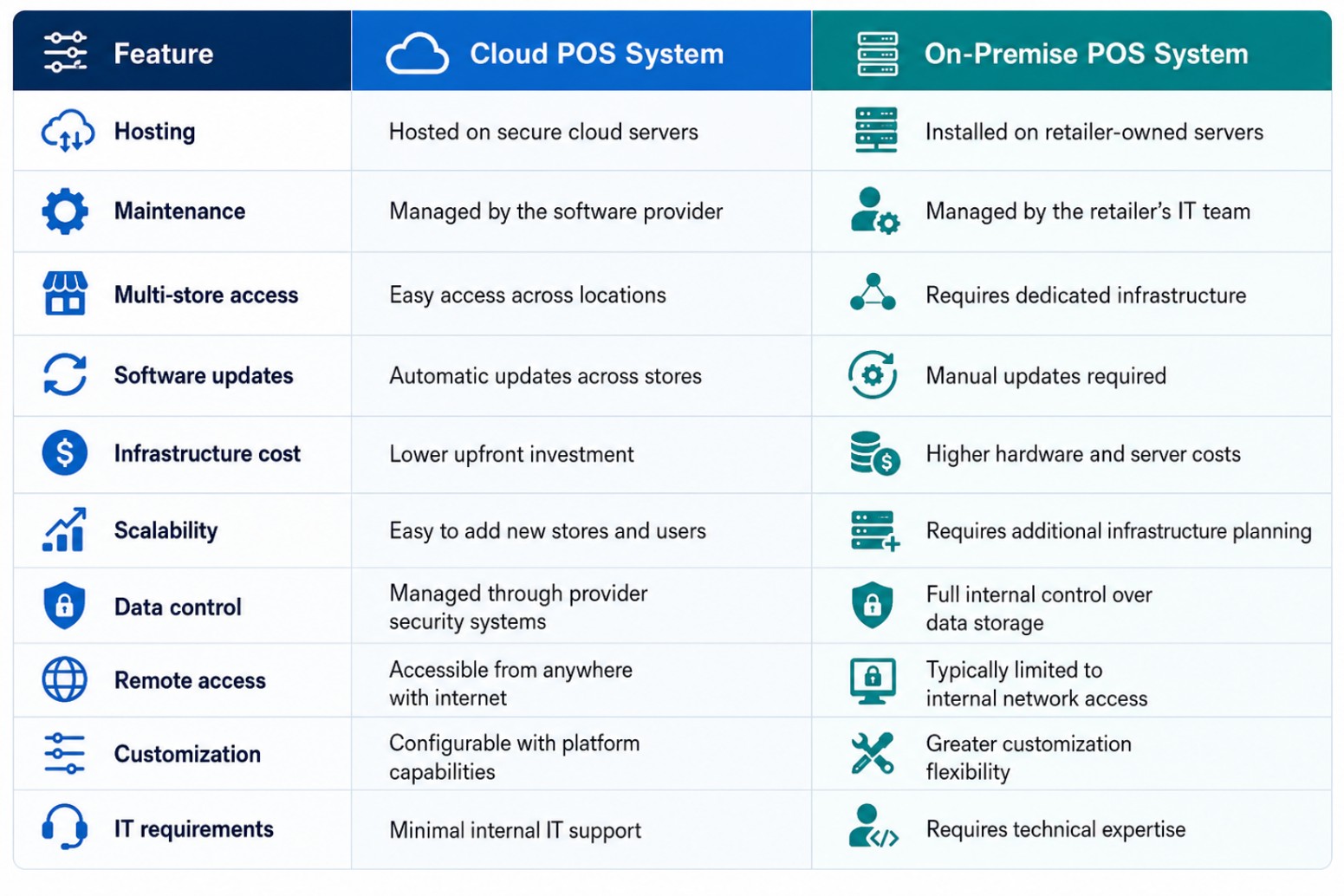
The best POS system for multiple stores depends on how your retail business operates today and where you plan to grow.
A cloud POS system is often a strong choice for retailers that prioritize flexibility, faster expansion, and centralized management. It works especially well for businesses opening new locations, managing distributed teams, or connecting physical stores with ecommerce channels.
An on-premise POS system may be the better option for retailers that require complete control over infrastructure, advanced customization, or specific internal security requirements.
However, many modern retailers no longer want to choose between flexibility and control. This is where a hybrid POS system can provide additional value.
A hybrid POS system combines cloud accessibility with on-premise capabilities.
This approach allows retailers to keep certain operations locally while using cloud technology for centralized management and reporting.
A hybrid POS solution can help retailers:
For retailers with multiple locations, a hybrid model provides flexibility as business requirements change.
For example, a growing retail chain may prefer cloud-based reporting and centralized inventory management while keeping specific operational processes within its local infrastructure.
Before selecting a POS solution, retailers should evaluate several important factors.
1. Consider Your Store Growth Plans
If your business plans to open additional locations, choose a POS system that can scale easily.
Ask:
A scalable POS system prevents technology limitations from slowing business growth.
2. Evaluate Inventory Management Capabilities
Inventory accuracy becomes more challenging as retailers add locations.
The right POS system should provide:
A centralized inventory system helps retailers reduce stockouts and improve customer satisfaction.
3. Look for Omnichannel Capabilities
Today's customers expect connected shopping experiences.
A modern POS system should integrate:
An omnichannel POS system helps retailers create consistent experiences across every touchpoint.
4. Review Reporting and Analytics Features
Retail decisions depend on accurate data.
A strong multi-store POS system should provide insights into:
Retail analytics with business intelligence (BI) helps retailers identify opportunities and improve operations.
5. Consider Total Cost of Ownership
The initial software cost is only one part of the investment.
Retailers should consider:
The right POS system should deliver long-term value, not just a lower upfront price.
Retailers need a POS platform that supports their current operations while preparing them for future growth.
ChainDrive POS software provides a flexible retail management solution designed for multi-store retailers, supporting cloud, on-premise, and hybrid deployment options.
With ChainDrive, retailers can manage:
This retail-native platform helps businesses connect stores, inventory, customers, and operations through one centralized system.
Whether a retailer operates a few locations or manages a growing retail chain, ChainDrive provides the flexibility to choose the deployment model that best fits its business needs.
A: The best POS system for multiple stores provides centralized management, real-time inventory visibility, omnichannel support, and scalable features for growing retailers.
Cloud POS software offers flexibility and easier scalability, while on-premise POS software provides greater infrastructure control. Hybrid solutions combine both benefits.
Yes. Multi-store POS software helps retailers track inventory, manage transfers, monitor stock levels, and improve replenishment decisions across locations.
Retailers should look for inventory management, centralized reporting, CRM, omnichannel capabilities, pricing management, and flexible deployment options.
There is no single answer for every retailer.
A cloud POS system may be the right choice if you need:
✅ Faster expansion
✅ Easy multi-store management
✅ Lower infrastructure requirements
✅ Remote access to business data
✅ Automatic updates
An on-premise POS system may be the better option if you need:
✅ Greater control over infrastructure
✅ Extensive customization
✅ Internal data management
✅ Specific IT requirements
A hybrid POS system can provide the flexibility many modern retailers need by combining centralized cloud capabilities with local operational control.
The most important factor is choosing a POS platform that supports your business strategy, not just your current requirements.
Managing multiple retail locations requires technology that connects every part of your business.
The right POS system helps retailers improve inventory accuracy, streamline store operations, understand customer behavior, and deliver better shopping experiences.
While cloud and on-premise POS systems each offer unique benefits, retailers should focus on finding a solution that provides:
A flexible retail management platform allows businesses to adapt as customer expectations and market demands continue to change.
Growing retailers need more than a traditional checkout system. They need a complete retail management platform that connects stores, inventory, customers, and operations.
ChainDrive point of sale software helps retailers manage multi-store operations with flexible deployment options, including cloud, on-premise, and hybrid environments.
From POS and inventory management to CRM, order fulfillment, warehouse management, and retail analytics with BI, ChainDrive gives retailers the tools they need to operate efficiently and scale confidently.
Ready to simplify your multi-store retail operations?
👉 Request a ChainDrive demo today and see how a flexible POS system can help your retail business grow.
At Multidev, we collaborate with clients to deliver tailored retail and eCommerce solutions that optimize operations, enhance efficiency, and drive growth.